
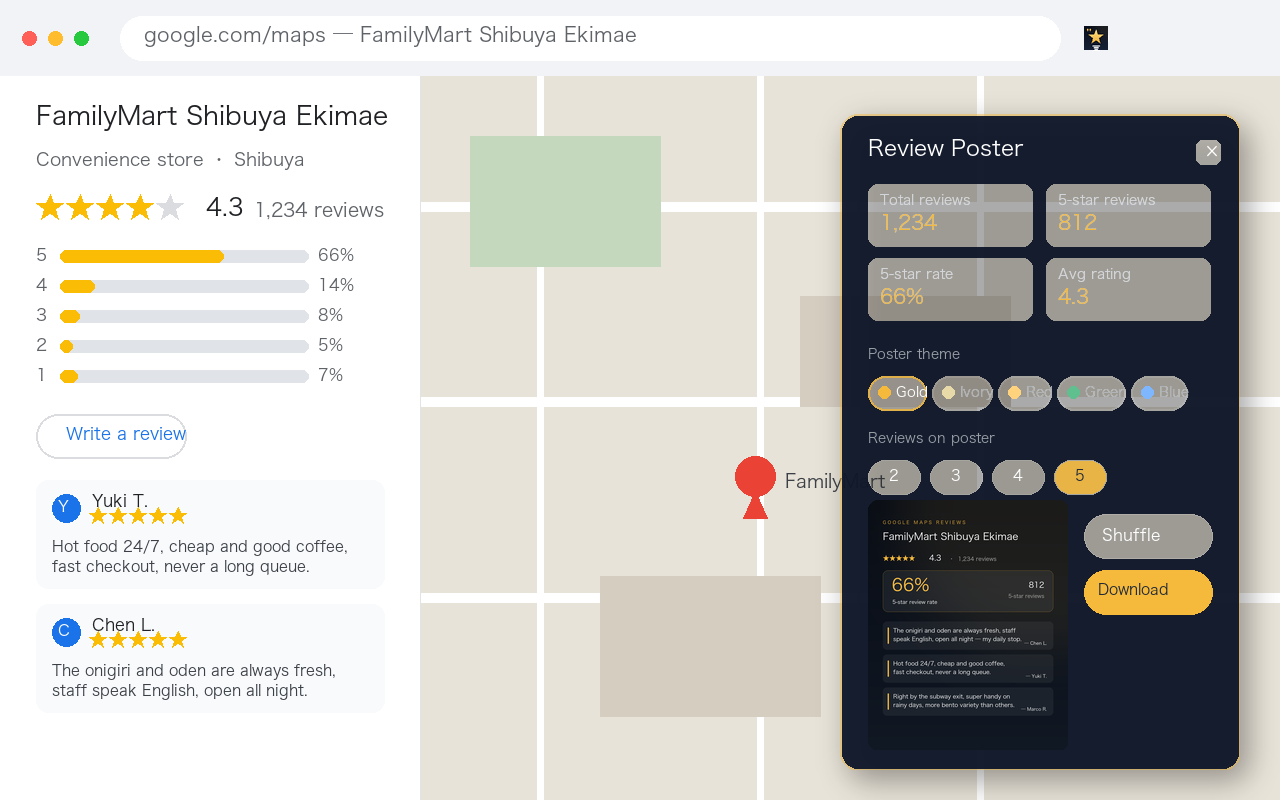
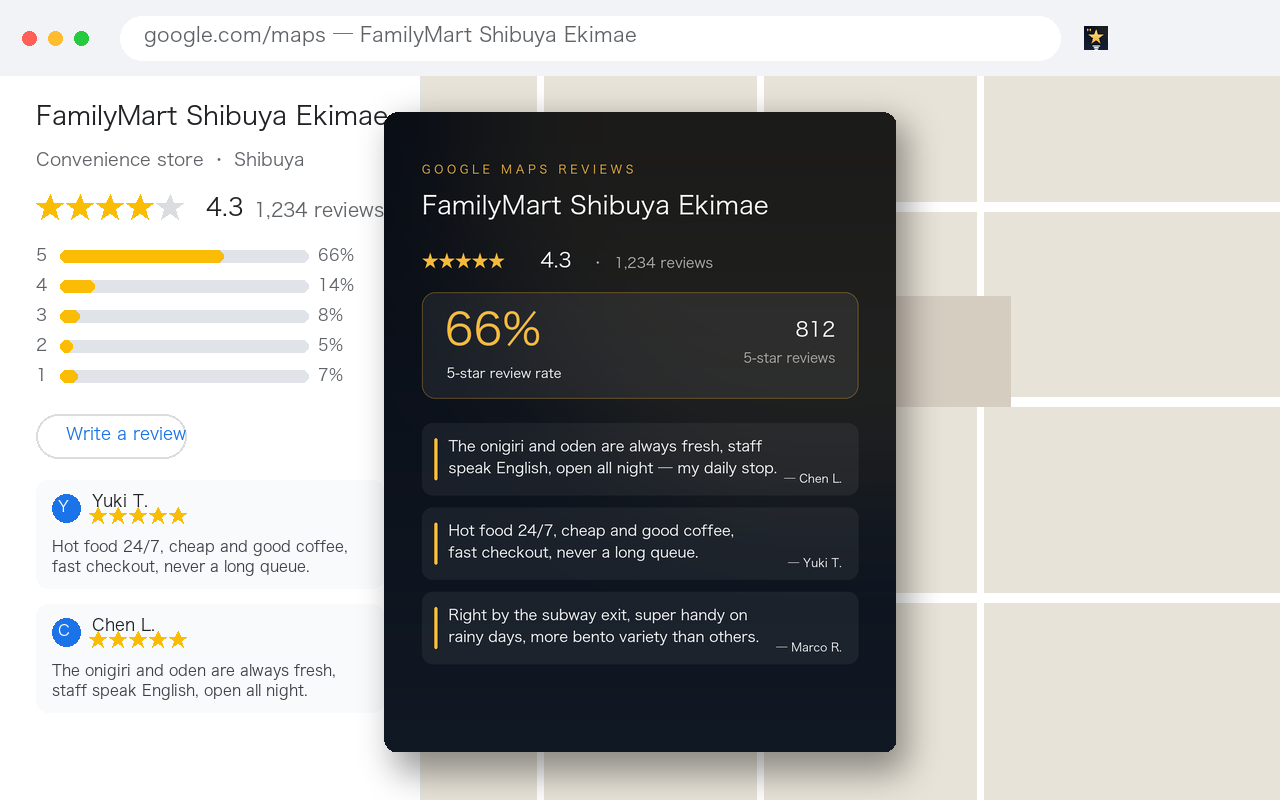
The extension reads three numbers from a Google Maps review page (total reviews, 5-star reviews, 5-star rate), sorts reviews by highest rating, scrolls to collect 5-star reviews that contain text, samples two to five of them, and lays them out as a 1080×1350 poster you can download. Everything runs locally: no network calls, no API key, no review text leaving your browser.
Before building this I tried the other route: send the whole batch of reviews to an AI model and ask for a translation plus a summary. It worked, but it was not pleasant to use. Each run took tens of seconds; a weak connection could time out; free tiers returned "service busy" during busy hours. And the thing actually blocking me was not understanding each review — it was deciding whether the place was worth entering, and being able to show that verdict to someone else. So the design changed: no analysis, just statistics and one image.
1. The problem is not comprehension, it is volume
Restaurant reviews are expensive to read for three reasons:
- There are a lot of them. A popular place has hundreds; the page loads a few dozen and only fetches more as you scroll.
- They are multilingual. In tourist areas one restaurant collects Japanese, English, Korean, Chinese and Thai reviews, and Google's translation link works one review at a time.
- The signal density is low. Most reviews say "good" or "nice". The useful judgements hide in a handful of longer ones.
When people actually decide, they look at two things: the proportion of positive ratings, and the specifics that keep coming up in those positive reviews — portion size, service, opening hours, location. Neither requires reading everything; both require splitting the reviews by rating first and sampling from the top bucket.
2. What it actually does
| Step | How | What you see |
|---|---|---|
| Read stats | Parse the rating summary and the star histogram on the page | Total reviews, 5-star count, 5-star rate, average rating |
| Sort | Open the review sort menu and pick "Highest rating", pulling 5-star reviews to the top | A progress line saying it is sorting |
| Collect | Scroll the list, keeping only 5-star reviews that have text, until the pool is big enough | Live count of scanned and usable reviews |
| Render | Sample a few and draw a 1080×1350 poster with Canvas | Preview, shuffle, download PNG |
Sorting is the trick that makes the rest cheap. Reviews default to "most relevant" or "newest", so five-star ones are not necessarily near the top and you would scroll for a long time to fill a sample. After sorting by highest rating, the first few dozen are almost all five stars. This is also how an early bug surfaced: without sorting, on a place with 38,000 reviews, the extension scrolled for a minute and collected zero five-star reviews.
3. Using it in five steps
- Install Maps Review Poster from the Chrome Web Store. There is nothing to configure afterwards.
- Open any place on Google Maps and switch to its reviews, or click the "N reviews" line.
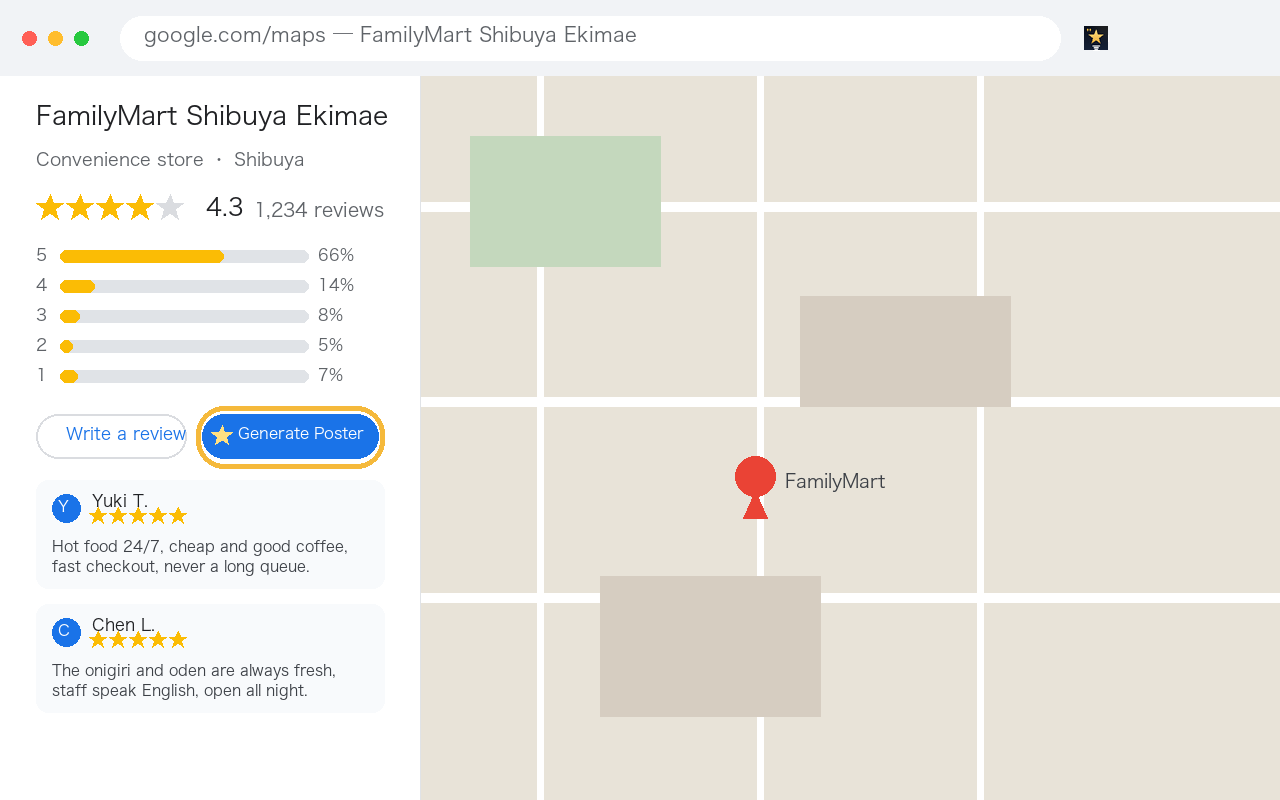
- Click the extension icon in the toolbar (pin it first if it is hidden behind the puzzle icon). One click gets it going: the extension sorts, scrolls a few screens and collects five-star reviews — usually ten to twenty seconds. A Generate Poster button also appears next to "Write a review" on the same page, so you can re-run it from there.
- In the panel, choose a theme (dark gold, ivory, China red, deep green, business blue) and how many reviews to show (two to five). Shuffle re-samples.
- Download a 1080×1350 PNG, ready for social media, a shop profile or a slide deck.
The interface follows your browser language and supports English, Japanese, Korean, Portuguese and Spanish; other languages fall back to English. The buttons are short words anyway: Generate Poster, Shuffle, Download. The Maps page itself keeps the language you set.
4. How the numbers are defined
Statistical tools get vague exactly where they should not. So, precisely:
- 5-star rate = 5-star reviews ÷ total reviews. Not four-star plus five-star. If the poster is called a 5-star poster, quietly folding four-star reviews in would misrepresent the place.
- Numbers come from Google's own histogram — the accessible labels on the "5 stars, 30 reviews" rows. The extension does not recount reviews; it reads what the page already computed, so the poster agrees with what you see.
- It estimates when the histogram cannot be read. On unusual page layouts it multiplies the total by the 5-star share of the collected sample and labels the result as an estimate rather than pretending to be exact.
- The quoted reviews are a sample. Five by default, two to five by choice. Five quotes never represent everything, which is why the poster also prints the total review count, the 5-star count and the rate, so a reader can judge the sample size.
5. Why it stays local
The biggest difference from the first version is that every network request was removed. Three reasons, in order of importance:
- The reviews belong to other people. Google reviews are written by real users; bundling them off to a third-party server, even just to pass through a model, is passing on someone else's words. Local processing avoids the question entirely.
- No key means no friction. Asking users to sign up for an AI service, obtain an API key and paste it into a settings page loses most of them. Without a key, installing is the whole setup.
- Stability. Anything that depends on an external API inherits rate limits, timeouts and busy periods. Local code depends on two things only: the DOM already rendered on the page, and Canvas.
The trade-off is that it cannot "understand" reviews. You get original sentences instead of a summary paragraph — and those few original sentences usually persuade better than a balanced summary anyway.
The extension does not ask for the usual "read and change all your data on google.com" access. It gets temporary access to the one tab you are on, only at the moment you click its toolbar icon, and nothing more. It never runs on other sites or in other tabs. That is also why installing it shows no scary permission warning — it was built that way on purpose.
6. What it cannot do
- Replace reading. It draws the outline of a reputation; the detail — which dish to order — still needs a couple of long reviews.
- Survive a Google redesign by itself. It relies on page elements and attributes to find reviews, and those need updating when the markup changes. That is the common fate of every extension that reads a page, not a flaw specific to this one.
- Handle places with very few reviews. Fewer than five is skipped outright, because sampling five out of four is meaningless.
- Report criticism. Negative reviews are not used on the poster. That is not whitewashing: the poster exists to recommend a place, not to be a full reputation report. To judge risk, read the low-rated reviews on the page.
7. Wrapping up
The extension does something small: read a place's rating numbers, sample a few five-star reviews, and lay them out as an image. What it solves is a very concrete moment of travelling — deciding in ten seconds whether to walk into a place when the menu is hard to read and the reviews are impossible to finish; and, when you genuinely like a small shop, turning its praise into something you can post.
It is free, needs no configuration, and never sends your browsing data anywhere. If you often look for food abroad, it is worth one try.
Frequently asked questions
Is the extension free? Do I need an account or an API key?
It is free. No sign-up, no login and no API key. It does not call any AI service; the poster is drawn with Canvas inside your own browser.
Does it upload my data or the review text?
No. A content script reads only the reviews already rendered on the page you are looking at, and the extension makes no network requests at all.
Why does the poster only show a few reviews?
It randomly samples five by default, and you can choose two to five in the panel. Shuffle re-samples from the collected pool without reloading the page.
The 5-star rate differs from what Google shows. Why?
The rate is 5-star reviews divided by total reviews, not 4-star plus 5-star. Counts come from Google's own rating histogram; when the histogram cannot be parsed the extension estimates from the sampled reviews and labels the number as an estimate.
Which languages is the interface available in?
It follows your browser language and supports English, Japanese, Korean, Portuguese and Spanish; any other language falls back to English. The Google Maps page itself stays in whatever language you use.
Why does nothing happen on some places?
Places with fewer than five reviews are skipped, because sampling would be meaningless. Google also changes its page structure from time to time, and the selectors then need updating; when numbers cannot be read the panel reports how many reviews were scanned and how many were 5-star.