
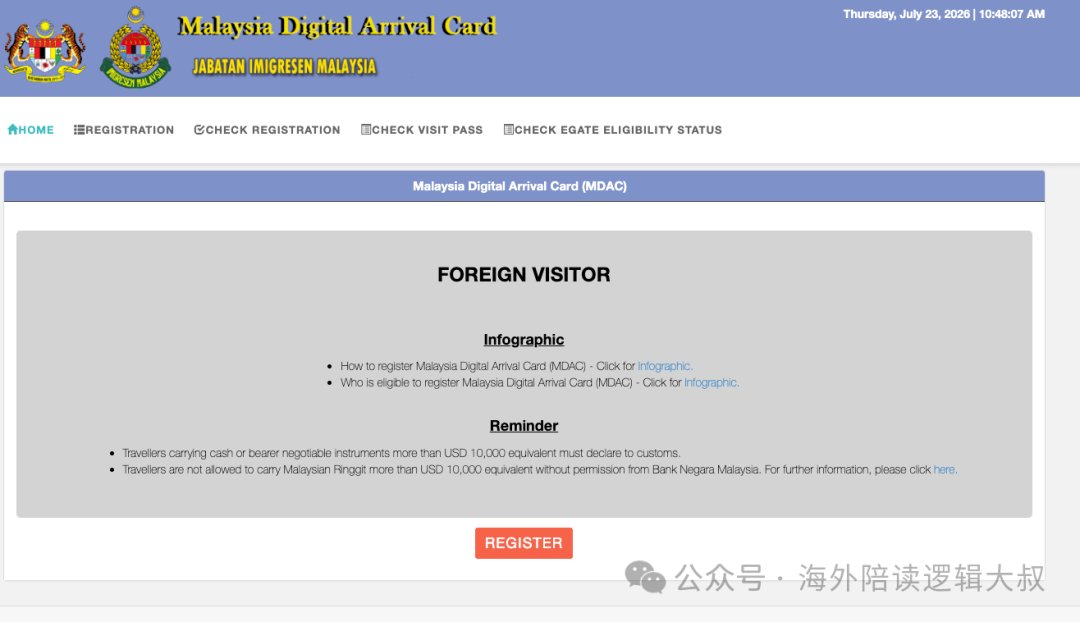
The MDAC must be submitted before entering Malaysia. It has been mandatory since 1 January 2024 and, without it, the automated gate will refuse to open. You can submit from 72 hours before arrival, one form per person, infants included. The official site is free and ends in .gov.my.
1. What the MDAC actually is
The Malaysia Digital Arrival Card is an electronic arrival registration run by the Malaysian Immigration Department. It became mandatory on 1 January 2024, replacing the paper card that used to be handed out on the plane.
Many countries now have a similar system. The idea is the same everywhere: your arrival details are filed in advance so that immigration can pre-screen you before you land.
It is an arrival registration, not a visa. Visa-free travellers still need to submit it, and submitting it does not guarantee entry — the final decision always belongs to the immigration officer.
2. Who must submit it, and who is exempt
The rule of thumb: short-term foreign visitors must submit it; holders of long-term passes are exempt.
| Traveller | MDAC required? |
|---|---|
| Foreign tourists, business travellers and family visitors | Yes |
| Children and infants | Yes — filled in by a parent |
| Singapore citizens | Exempt by nationality |
| Diplomatic passport holders | Exempt |
| Returning employment pass / student pass holders | Exempt (long-term pass) |
| MM2H (Malaysia My Second Home) holders | Exempt |
It is one form per person. Infants need their own. This is the mistake that most often leaves a family stuck in front of the automated gate.
3. When to submit: how the 72-hour window works
The commonly repeated phrase "three days in advance" is misleading. It is not "any time in the three days before departure" — it is 72 hours counted backwards from your arrival time.
| Timing | Rule |
|---|---|
| Earliest | 72 hours before arrival. Arriving Friday 12:00? The earliest you can submit is Tuesday 12:00 |
| System refresh | Date data is typically refreshed around 10am, so submissions in the small hours may not go through |
| Latest | Same-day submission still works, but airport Wi-Fi and an all-English form are a bad combination — do not leave it to the last minute |
| Validity | Single entry. Resubmit for every arrival; it is not a one-off registration |
My advice: submit as soon as the window opens. If your travel dates change, simply submit a new form — the latest submission is the one that counts.
4. Have these seven things ready
Copy them into a notes app beforehand so you can paste instead of typing:
- An email address — for registration and the PIN code
- Passport — number, nationality, expiry date
- Arrival and departure dates
- Point of entry — KLIA, KLIA2, Penang International, etc.
- Purpose of visit — tourism or business
- Accommodation — hotel name and full address, or a friend's address
- Flight number — for land crossings use the vehicle plate, for trains just write
train
5. Filling it in, in five steps
Step 1 — Register on the official site
There is only one official entry point: imigresen-online.imi.gov.my/mdac.
- The domain must end in
.gov.my - It is completely free — close anything that asks for payment
- There is no official app; anything in an app store is third-party
- Chrome works best
Click REGISTER, enter your email and a password, then activate the account through the link sent to your inbox.
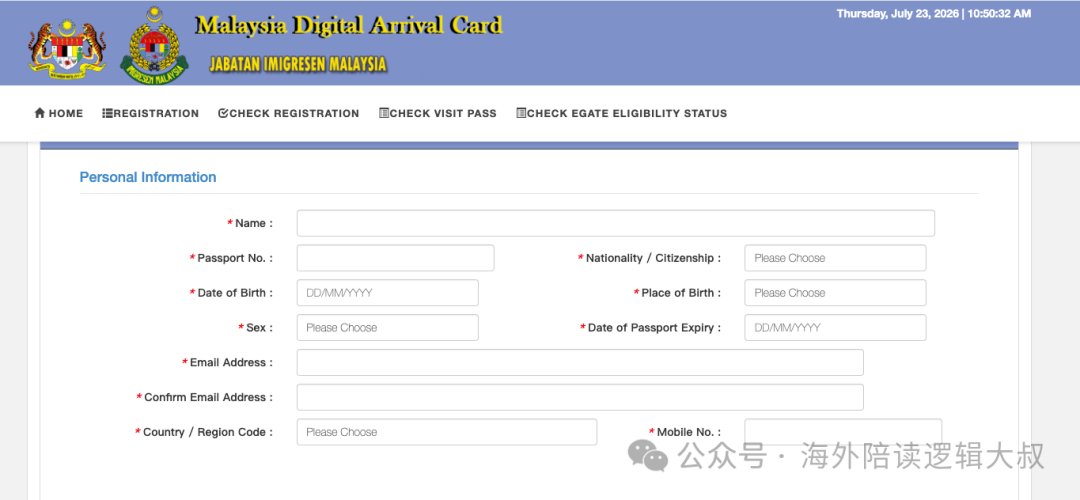
Step 2 — Personal details
Copy them from your passport character for character: name as printed, passport number, nationality, date of birth, sex, expiry date.
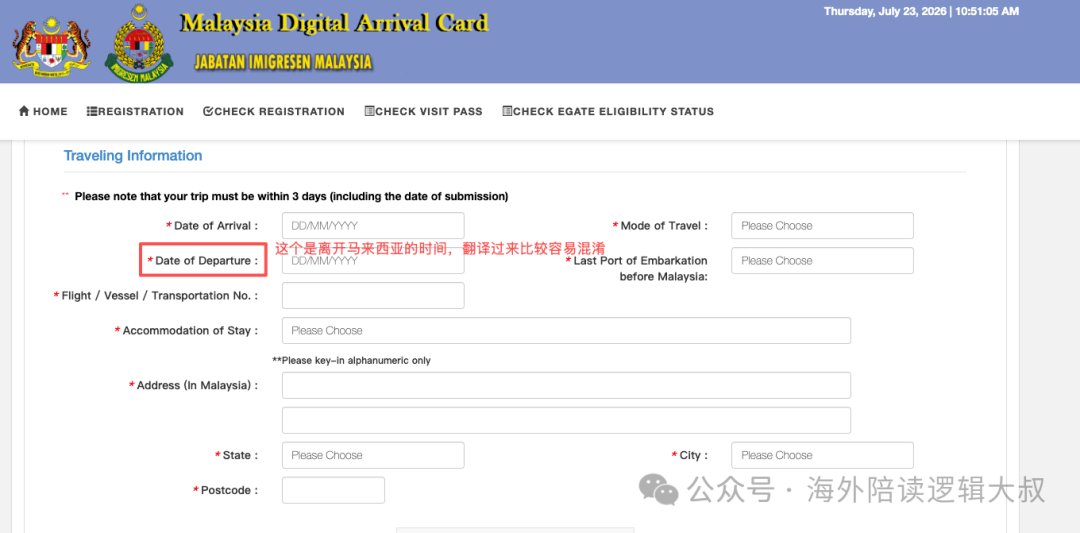
Step 3 — Travel details
Arrival date, departure date, mode of transport, flight number, country of departure, accommodation type, address and postcode, state and city.
Step 4 — Submit and wait for the PIN
Complete the captcha, click SUBMIT, and a PIN code will be emailed to you.
Check your spam folder first. The sender is mdac@imi.gov.my — add it to your contacts so it is not filtered next time. Some travellers also receive it via WhatsApp.
Step 5 — Download the PDF
Go back to the site, click CHECK REGISTRATION, enter your passport number, nationality and PIN, then scroll down and download the PDF from the bottom-right corner.
Save it on your phone (Files app on iPhone, file manager on Android) so it opens without a connection. A screenshot works too, but the PDF is clearer and looks more official.
6. The step that trips people up: splitting the address
Overseas addresses are structured differently from Chinese ones, and this is where most people end up editing the form again and again. Take a hotel in Penang:
| Field | What to enter |
|---|---|
| Hotel name | XXX Hotel Georgetown Penang |
| Address | No. 000, Burmah Road |
| Postcode | 10050 |
| City | Georgetown |
| State | Pulau Pinang (Penang) |
Which reads, in full: No. 000, Burmah Road, 10050 Georgetown, Pulau Pinang, Malaysia.
All of these fields appear on the hotel's booking page. For private rentals the full address often only appears after you book, so do not panic if you cannot find it straight away.
7. Travelling together? Reuse the form
If your family or group shares the same hotel and flights, there is no need to type everything out for each person:
- Fill in and submit the first person's form.
- Press the browser's Back button to return to the data entry page.
- Everything is still there — change only the passport number, name and date of birth.
- Submit again. The second person takes seconds.
- Repeat for everyone else in the group.
Stop at the data entry page, not the login page, or the form will be cleared. Use a laptop rather than a phone — there is a fair amount of typing.
8. Does anyone actually check it on arrival?
Honestly: most of the time the officer will not ask to see the document. When you use an automated gate, the machine reads your passport and pulls your MDAC record from the system — you do not hand anything over.
But here is the catch: you still have to submit it. Without it, the automated gate throws an error and simply will not open. If you get pulled aside, you will be filling it in at the airport on your phone — poor signal, all-English interface, and no time to think.
On automated gates: holders of biometric passports from China and various other countries can use them, provided the passport has at least six months' validity, is undamaged, and the MDAC has been submitted. They are intended for visa-free tourism stays of up to 30 days. If you need an entry or exit stamp in your passport, use the manual counter instead. Check the immigration department's current list for your nationality and stay limit.
Frequently asked questions
Does it cost anything?
No. Any site requesting payment is a third party or a scam. If you are filling it in for an elderly relative, do it for them.
How long does it take?
Three to five minutes the first time. Afterwards your details are pre-filled, so usually under two minutes.
Should I print it?
Not necessary. Keep the PDF on your phone. Printing a spare copy is fine if it makes you feel better.
What if I made a mistake?
There is no edit option — submit a fresh form. The most recent one applies.
What about transit passengers?
If you stay inside the international transit area, you do not need one. If you intend to enter the country, you do.