
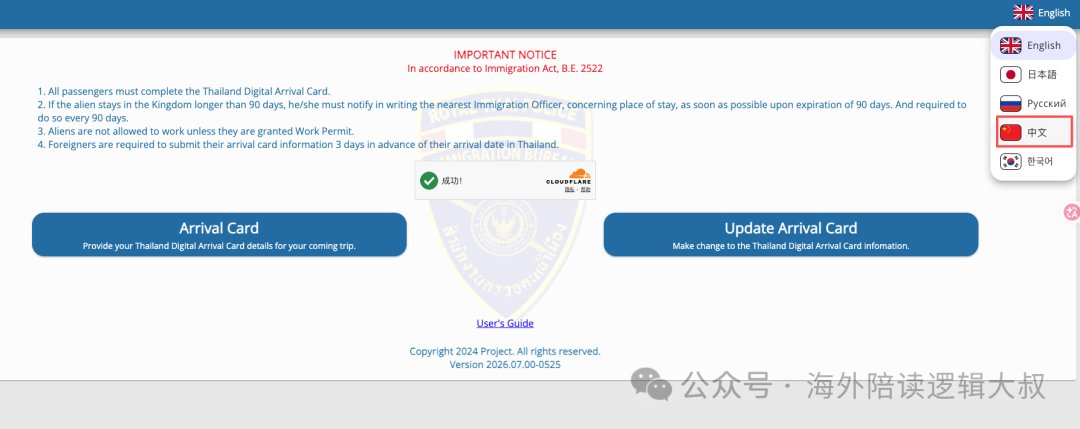
The TDAC must be filed before entering Thailand. It replaced the paper TM6 on 1 May 2025 and applies to everyone on a foreign passport, infants included. Submit within three days, or 72 hours, of arrival; it is single-entry. The only official site is tdac.immigration.go.th and it is free.
1. What the TDAC is
The Thailand Digital Arrival Card replaced the blue-and-white paper TM6 form that used to be handed out on flights. Since 1 May 2025 the paper form has been withdrawn at Thailand's main international airports, and the process moved online.
The rule is simple: everyone entering Thailand on a foreign passport must submit one. That includes children and infants — parents fill them in on the child's behalf.
There is only one official site: tdac.immigration.go.th. The Thai government's portal is relatively friendly, with a Chinese language option in the top-right corner, but the English field names are not complicated either.
Visa-free entry and the TDAC are two separate requirements. Even if you do not need a visa, you still need to submit the TDAC.
2. When to submit: the 72-hour window
Officially, you submit within three days of your arrival date — a 72-hour window.
| Item | Details |
|---|---|
| Earliest | Three days before arrival. Arriving in Bangkok on 5 August? You can submit from 2 August |
| Latest | Same-day submission works, as long as you have not cleared immigration yet |
| Occasional issues | Sometimes the date list has not refreshed and your arrival date is not selectable — try again a few hours later |
| Validity | Single entry. Three trips in a month means three separate forms |
Submit in advance if you can. The airport does have free Wi-Fi, but the speed will make you grateful you prepared beforehand.
3. Four things to have ready
- Passport — valid for at least six more months
- Flight details — flight number, airline, arrival airport. For land crossings, enter
carortrain - Accommodation address in Thailand — hotel name plus full address
- A working email address — for the confirmation
4. Filling it in, in seven steps
Step 1 — Open the official site
Go to tdac.immigration.go.th. On the homepage you will see a blue Arrival Card button. Click it to begin.
Step 2 — Passport details
You can either type everything manually or scan the machine-readable zone (MRZ) — the two lines with <<< at the bottom of your passport's data page.
Scanning is safer; manual entry invites typos. When done, click Continue.
Step 3 — Travel and accommodation details
You will need your flight number, arrival date, airline and your address in Thailand.
Splitting the address is where people hesitate. The form has five fields: Hotel Name, Address, District/Area, Province and Postal Code. Take a Bangkok hotel whose full address is 000 Soi Sukhumvit 10, Khlong Toei, 10110 Bangkok, Thailand:
| Field | What to enter |
|---|---|
| Hotel Name | Centre Point Sukhumvit 10 |
| Address | 000 Soi Sukhumvit 10 |
| District / Area | Khlong Toei |
| Province | Bangkok |
| Postal Code | 10110 |
It works the same way in other cities. All of these fields appear on your Booking or Agoda reservation — just copy them across.
Step 4 — Health declaration
The system decides whether to ask for health information based on your nationality and where you have travelled in the past 14 days. Most travellers skip straight past this step. If you are asked, answer honestly.
Step 5 — Add your travel companions
Travelling with family or friends? Click Add Other Travelers and add them one at a time. There is a genuinely useful option here: Same as Previous Traveler. Tick it and the travel and accommodation details are copied from the previous traveller — you only change the passport information.
For a family of four, the first person takes three minutes and each of the others takes about one. When everyone is added, click Preview.
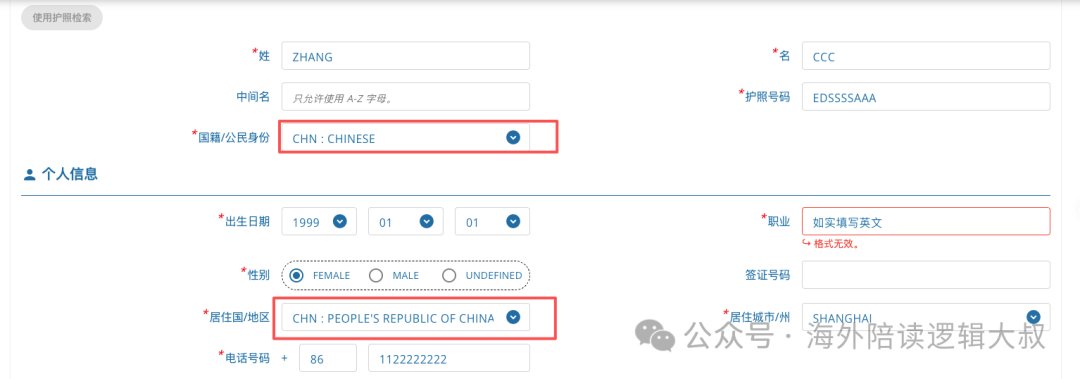
These two fields are easy to confuse. Citizenship is your nationality as printed on the passport; residence is the country where you actually live long-term. Fill them in according to your own situation.
Step 6 — Check and submit
Read through everyone's details. Passport numbers and name spellings must match the passports exactly. Use Edit to go back and correct anything.
Once confirmed, enter your email, accept the terms and click Submit.
Step 7 — Download the PDF immediately
You will be taken to a download page — save the PDF to your phone right there. A confirmation email arrives with the same link.
Show the PDF on your phone at immigration, or print it. Customs will most likely not ask to see it, but there is no harm in being prepared.
5. Key reminders
- There is only one official address: tdac.immigration.go.th
- It is completely free — anything charging a fee is an impostor
- Submit within three days of arrival, not at the check-in counter
- Match your passport exactly, letter for letter
- Everyone needs one, including the baby in your arms
- Save the PDF to your phone so it works without a connection
- The TDAC is not a visa — visa-free travellers still need it
Frequently asked questions
Does the TDAC cost anything?
No, it is completely free. Close any site asking for payment — it is either an unofficial agent or a scam.
Do children need their own form?
Yes, infants included. Add them under 'Add Other Travelers' — the 'Same as Previous Traveler' option speeds this up considerably.
What if the confirmation email never arrives?
Check your spam folder first. If you still cannot find it, do not worry — immigration can look up your submission in their system.
What if I have no phone or connection?
Suvarnabhumi, Don Mueang, Phuket, Chiang Mai and Hat Yai airports all have self-service kiosks, plus free Wi-Fi.
Can I edit it after submitting?
Before submitting, freely. After submitting there is currently no clear online edit route, so check carefully first.
Do I still need the paper TM6?
The four main international airports have fully switched to TDAC. Smaller airports and land border crossings may still use the paper form — follow the signs on site.