
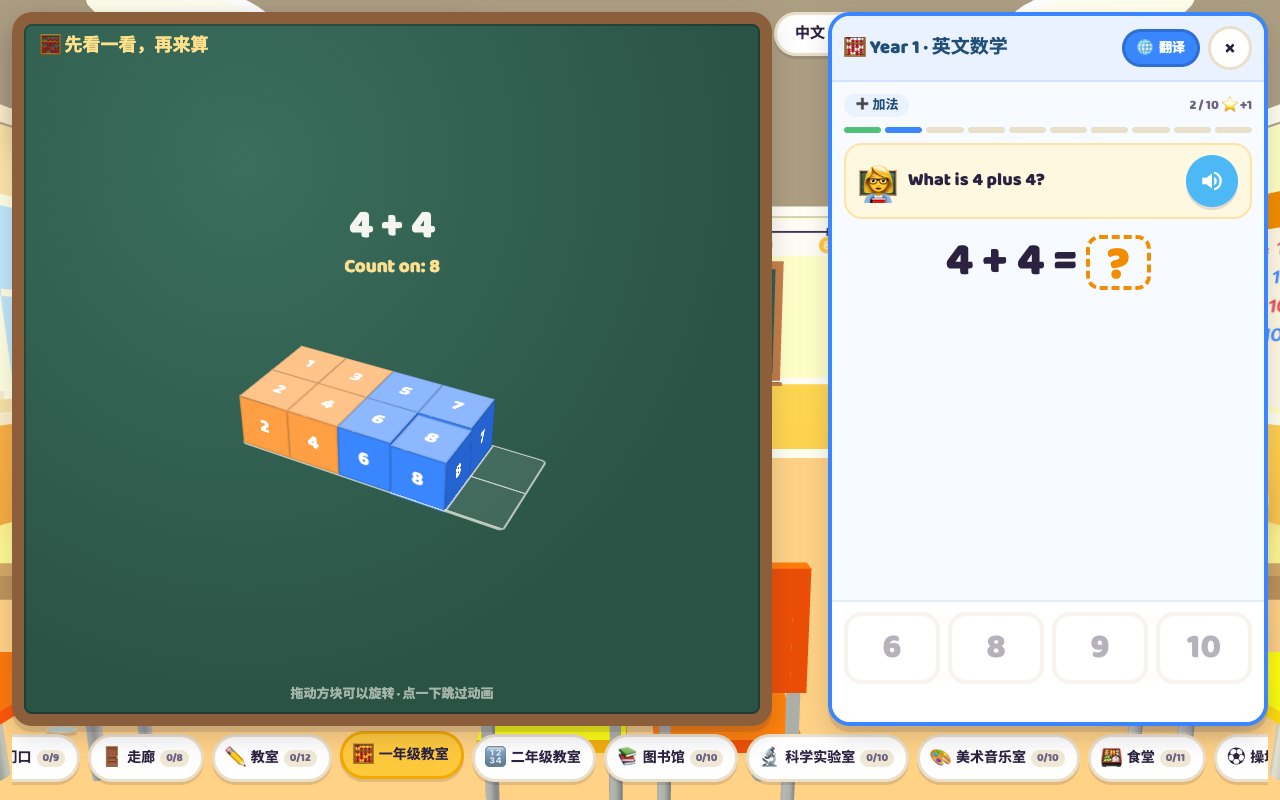
Word School in Word World now has Year 1 and Year 2 maths classrooms for adding and taking away in English: within 10 in Year 1 and within 20 in Year 2, where about seven in ten questions cross ten. A round has 10 questions: 3 adding, 3 taking away, 2 missing numbers and 2 word problems, read aloud and first built with 3D cubes on a blackboard (dropping in for adding, flying off for taking away) before four choices unlock, with retries. Afterwards every question gets a picture explanation with ten frames, a number line and one spoken English sentence, using make ten or break ten where needed. Free; needs a free GachaLex account.
At an international school, maths is taught in English. When my child changed schools, adding and taking away were not the problem; the homework was. He did not know that take away means minus, that altogether asks for the total, or how to read a whole word problem. The School scene in Word World used to teach school words and classroom dialogues. It now has two maths classrooms for practising sums in English.
1. Finding the classrooms
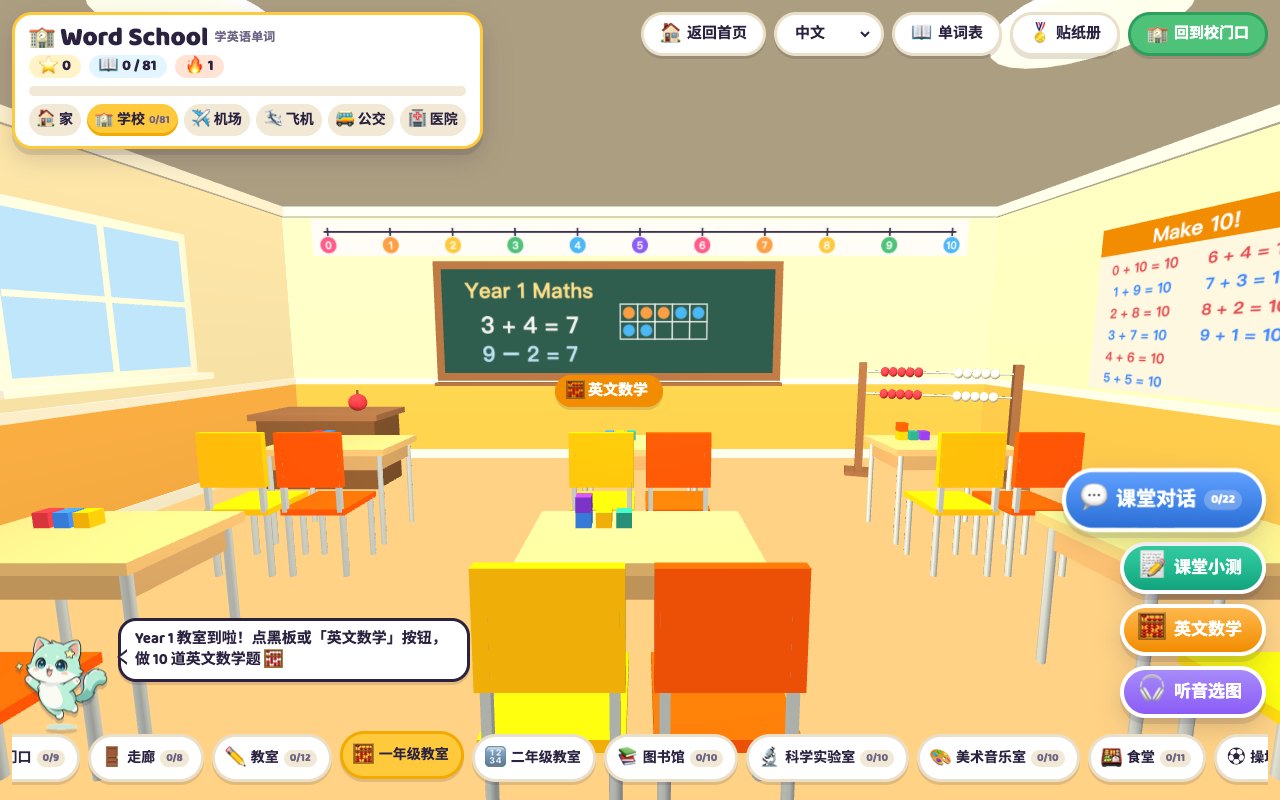
Open Word School, go through the gate into the hallway, and take the Maths corridor door on the south wall (it is in the room bar at the bottom too). The corridor has 11 maths rooms, Year 1 to Year 11; this article covers the first two. Inside, tap the blackboard or the Maths button at the bottom right to start a round.
The rooms are named after UK school years and cover the adding and taking away that 5 to 7 year olds do in maths. The walls carry a 0–10 or 0–20 number line, the Year 1 room has a number bonds to 10 poster, the Year 2 room has a 1–20 number chart, and the blackboard shows ten frames, just like a British primary classroom.
2. Watch the blackboard first, then answer
A question does not start with the choices. Once it has been read out, a blackboard opens on the left and builds the sum with 3D cubes, and the choices on the right unlock only when it finishes:
- Adding: orange cubes appear one at a time and are counted, then blue cubes drop in from above and the count carries on (Count on: 5, 6, 7…), ending with How many cubes now?
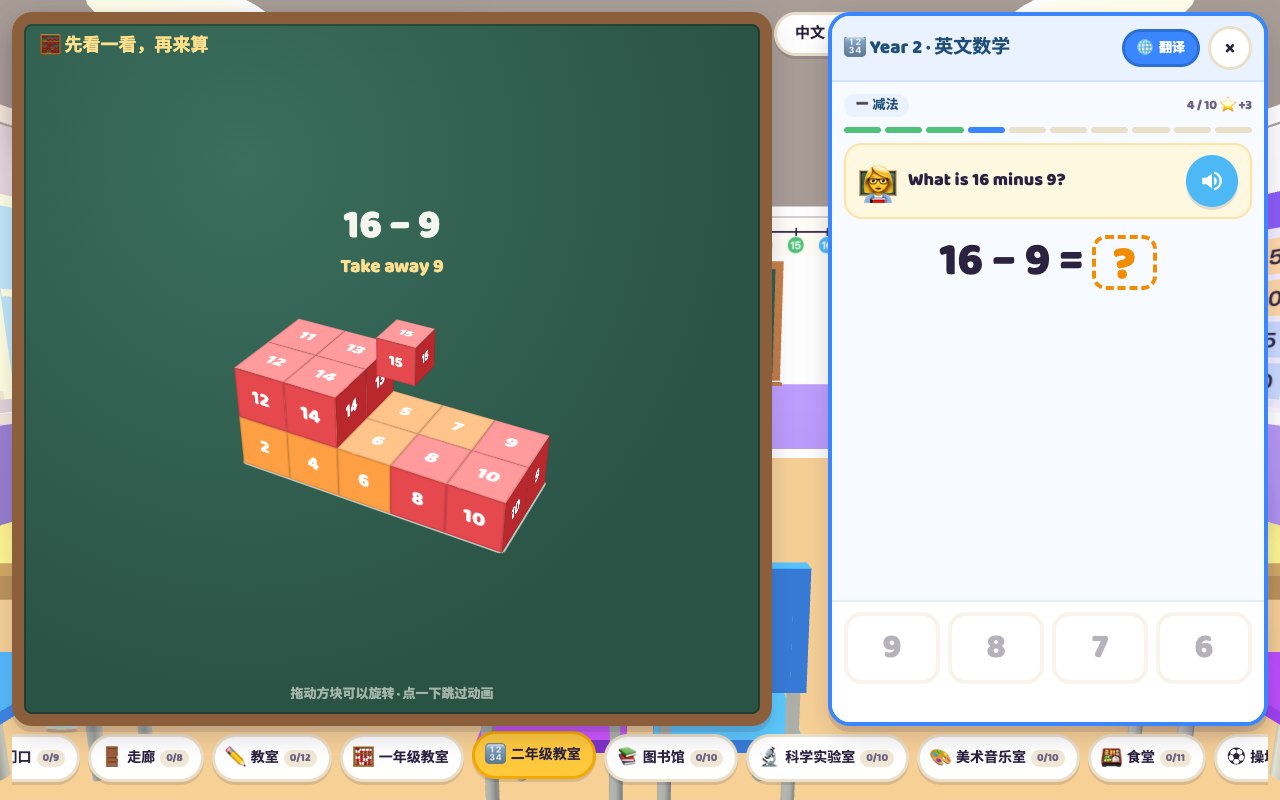
- Taking away: all the cubes are set out, the ones being taken away turn red and fly off one by one, ending with How many are left?
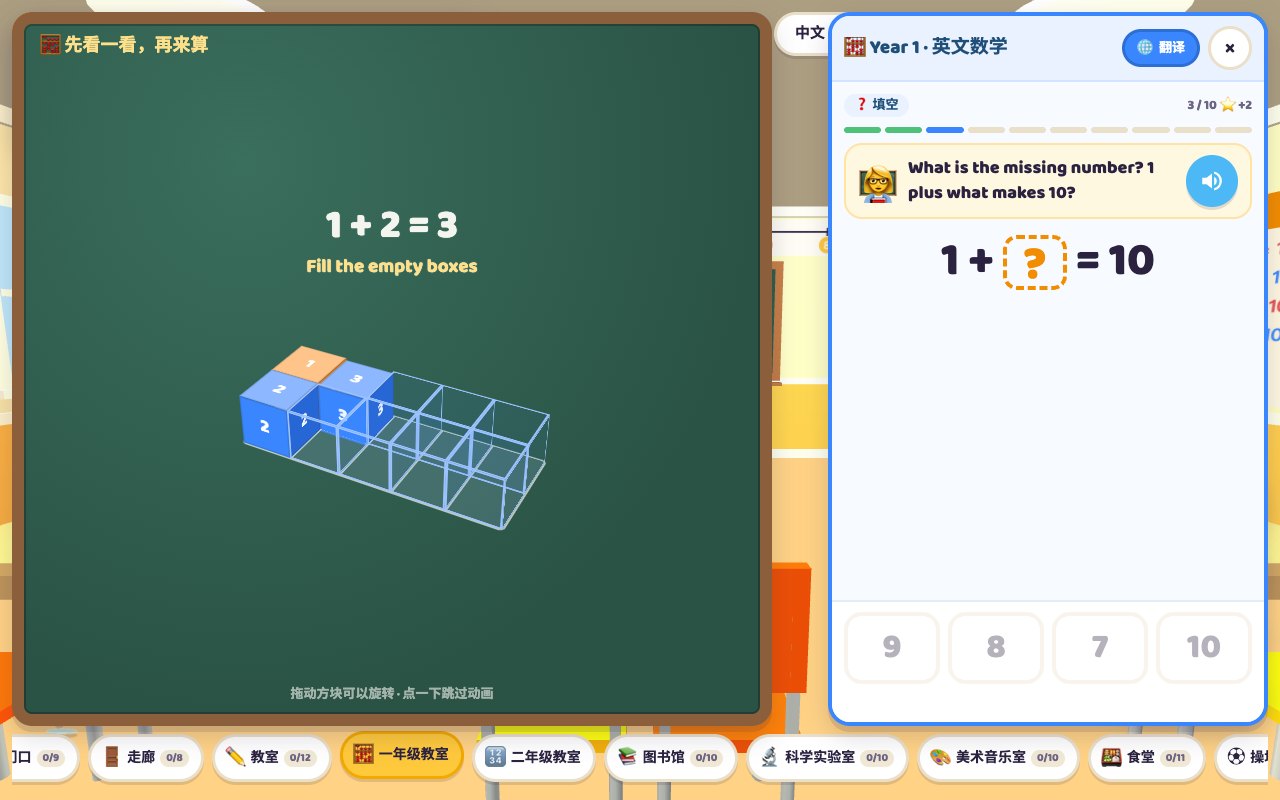
- Missing number: the first number is set out, dashed boxes mark the spaces up to the total, and blue cubes fill them one by one, ending with How many blue cubes?
The cubes are not in one long line. They follow the ten frame: the floor is a 5 by 2 grid and cubes go in pairs from left to right, so 4 cubes make a 2 by 2 square, 10 fill a layer, and 11 to 20 stack on a second layer. In Year 2, 16 − 9 then shows at a glance that 6 come off the top layer and 3 more from the bottom, which matches the break ten method in the explanations at the end. The block turns gently, children can drag it round to count from any side, and every cube is numbered.
The animation is unhurried and the reading is slower, so 5 to 7 year olds can count along. A child who already knows can tap the board to skip, and Again replays it. On a phone the blackboard sits in the top half of the screen with the question and choices below.
3. Ten questions a round, four kinds
| Kind | Per round | Example |
|---|---|---|
| Adding | 3 | What is 3 plus 4? 3 + 4 = ? |
| Taking away | 3 | What is 9 minus 2? 9 − 2 = ? |
| Missing number | 2 | What is the missing number? 2 plus what makes 7? 2 + ? = 7 |
| Word problem | 2 | Leo has 9 cars. He gives 8 to a friend. How many cars does he have left? |
Each question is read aloud when it appears, and the speaker button plays it again. Once the board finishes, there are four number choices, and the wrong ones are the easiest to mix up: one or two away from the answer. A wrong choice does not reveal the answer, so the child tries again. Right first time earns a star, and a perfect 10 earns two more. After a right answer the whole sum is read out, such as three plus four equals seven, so the child hears how sums are said.
Questions are generated fresh each round with no repeats inside a round. Names, objects (apples, balloons, fish, cookies, cars and more) and sentence patterns in the word problems change too.
4. Year 1 and Year 2
- Year 1: within 10. Sums never go above 10, and taking away starts from 10 or less. The focus is understanding plus, minus, take away and how many.
- Year 2: within 20. About seven in ten questions cross ten, such as 8 + 5 or 15 − 7. The rest are teens plus or minus a single digit, such as 14 + 6 or 16 − 3. Crossing ten is where make ten and break ten come in.
I suggest moving to Year 2 once Year 1 rounds reliably score 9 or 10. The results screen has a button for the next year and a year picker. Years 3 to 11 are covered in English Maths Year 3–11.
5. The picture explanations
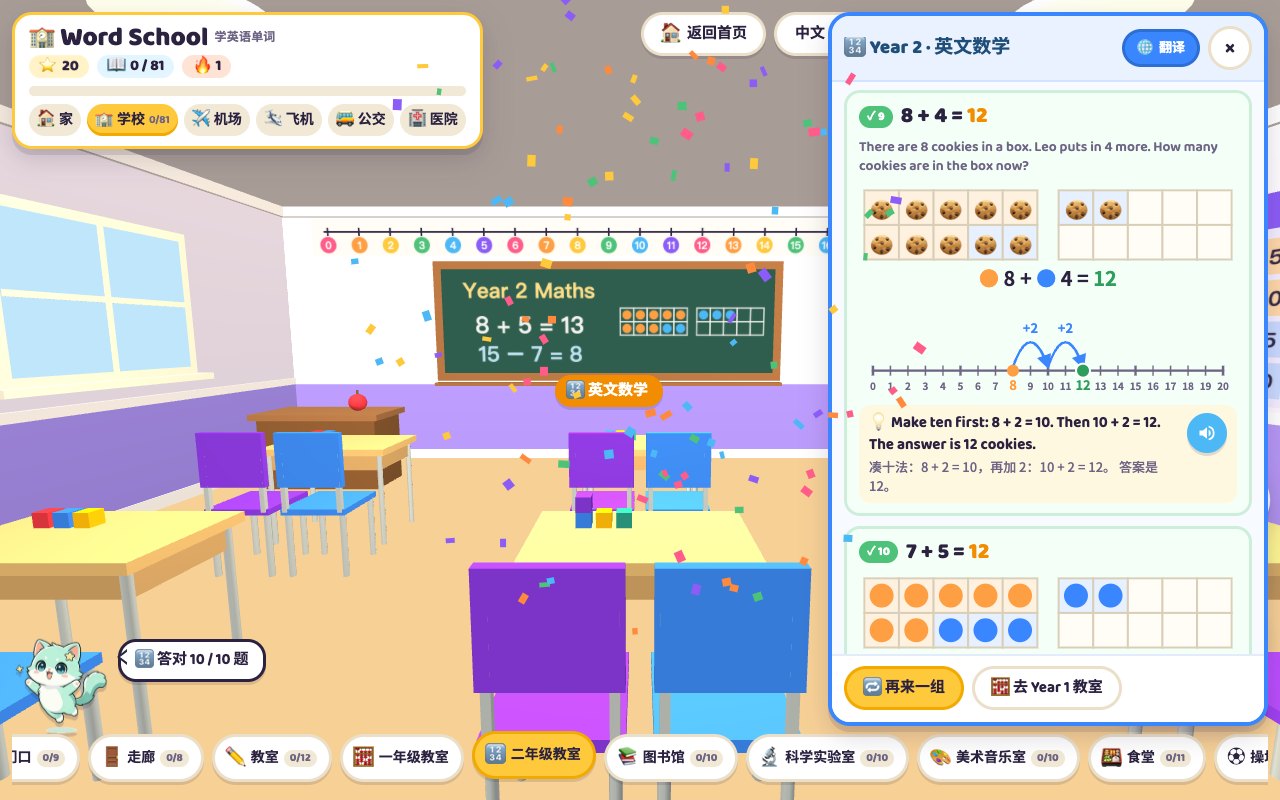
This is the part I cared about most. When the round ends, every question is drawn out. A wrong one is marked red and shows the child's first answer. Each question gets three things:
- Ten frames: 2 rows of 5. For adding, the first number is orange dots and the second is blue dots; for taking away, the dots being removed are crossed out. Year 2 has two frames, so 8 + 5 shows the blue dots filling the first frame to 10 and spilling 3 into the second. Word problems use the objects from the story instead of dots, so the balloon problem shows 9 balloons and 8 more.
- A number line jumping from the first number to the answer. In Year 1 it hops one step at a time; in Year 2 a sum that crosses ten jumps to 10 first and then the rest.
- One English sentence explaining the method, with a speaker button and a translation underneath on non-English pages.
Make ten: Make ten first: 8 + 2 = 10. Then 10 + 3 = 13. Break ten: Take away 5 to get to 10: 15 − 5 = 10. Then take away 2 more: 10 − 2 = 8. Sums that do not cross ten are explained as Start at 4 and count on 3: 5, 6, 7. or Count back 2 from 9: 8, 7.
In my experience a wrong answer is rarely about the maths. More often the question was not understood, or one number was counted twice. Seeing the frames and the number line makes it click faster than me explaining.
6. Maths English in a round
| English | Meaning |
|---|---|
| plus / add | + |
| minus / take away | − |
| equals / makes | = |
| How many ... now? / altogether | asks for the total (adding) |
| How many ... left? | asks what remains (taking away) |
| ... more / gives ... away | some are added / some are removed |
| the missing number | the blank in 2 + ? = 7 |
| count on / count back | count forwards / backwards |
7. How to use it
- One round a day, about five minutes, including the explanations. After school or before bed both work.
- Let the child read word problems first, and use the speaker only when stuck.
- Go through the red cards: have the child count the frames with a finger and say the explanation sentence out loud.
- Pair it with talking: the School scene's classroom dialogues include a maths lesson to practise next.
The maths classrooms are part of the School scene: free, with a free GachaLex account needed to play, and they work in any phone or computer browser. For how the six scenes fit together, see the Word World overview.
Frequently asked questions
What does the maths practice cover?
Adding, taking away, missing numbers such as 2 + ? = 7, and word problems in English. Year 1 stays within 10; Year 2 goes within 20, with about seven in ten questions crossing ten. Ten questions a round, all read aloud.
Is there teaching before and after?
Yes. Before each question a blackboard builds it with 3D cubes: dropping in for adding, flying off for taking away, filling dashed boxes for missing numbers, and the choices unlock after. After the round every question is explained again with ten frames, a number line and one spoken English sentence.
What happens after a wrong answer?
The answer is not shown and the child can try again. Right first time earns a star and a perfect round earns two more. The explanations mark wrong questions and show the first answer chosen.
Is it free?
Yes, it is free, but it needs a free GachaLex account because it sits in the School scene; only Home works without logging in. It works in phone and computer browsers, and the interface comes in English, Chinese, Japanese, Korean and Thai.